Another Update (Build 145) was released. And the Blogger Beta problem is fixed. Please visit the Writer Zone for the update. Or just download the latest version.
The following is a summary of the changes in the Writer 1.0 (Beta) Update:
- Tagging support
- Support for Blogger Beta
- Categories are sorted by name and support scrolling, plus improved support for reading categories from your blog
- Improved startup performance
- Paste is enabled for Title region and TAB/SHIFT+TAB navigation between title and body supported
- Insert hyperlink added to context menu when text is selected
- Title attribute in Insert Link dialog
- Custom date support for Community Server
- Improved keyboard shortcuts for switching views
- Change spell-check shortcut key to F7
- Add ‘png’ to insert image dialog file type filter
- More robust image posting to Live Spaces
- Improved style detection for blogs
- Fixed issues with pasting URLs and links
- Remember last window size and position when opening a new post
- Open post dialog retrieves more than 25 old posts
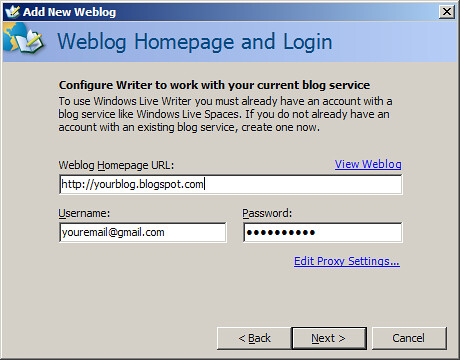
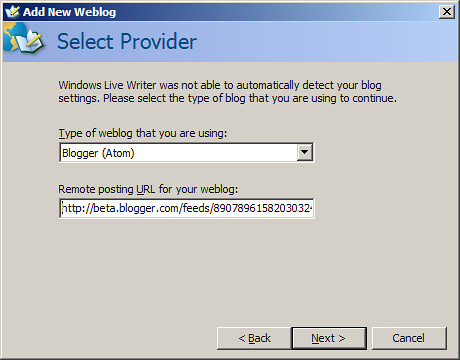
Although it is said Support for Blogger Beta, but I have to specify the Type of weblog and Remote posting URL by myself. The detection can not be done automatically for the moment.
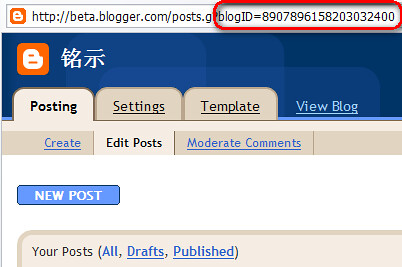
TIP: The Type of weblog for Blogger Beta is Blogger (Atom), and the Remote posting URL is http://beta.blogger.com/feeds/blogID/posts/full. You can see the blogID(a long number) in your web browser's address bar when you manage your posts at Blogger Beta. Below are snapshots showing how to do this.
PS: This post is published using Writer :)
Visit the Writer Zone.
Download the updated Writer.
This post is updated at 2006-09-29 17:11.

