Now a new beta version (145) of Windows Live Writer released.
Blogger Beta can be detected automatically.
Now a new beta version (145) of Windows Live Writer released.
Blogger Beta can be detected automatically.
Another Update (Build 145) was released. And the Blogger Beta problem is fixed. Please visit the Writer Zone for the update. Or just download the latest version.
OK. There is a workaround at Joe Cheng's blog.
See it here. It tells all the correct details to use Writer with Blogger Beta.
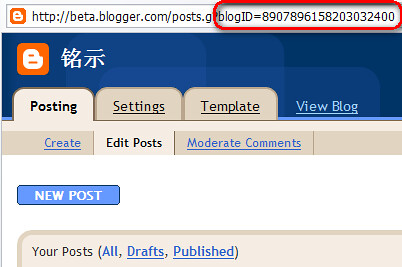
My method in my previous post is not all correct. The Remote Posting URL I suggested to use in the previous post is WRONG. Use the wrong Remote Posting URL you can not edit your posts. Correct Remote Posting URL should be http://beta.blogger.com/feeds/blogID/
Another Update (Build 145) was released. And the Blogger Beta problem is fixed. Please visit the Writer Zone for the update. Or just download the latest version.
The following is a summary of the changes in the Writer 1.0 (Beta) Update:
Although it is said Support for Blogger Beta, but I have to specify the Type of weblog and Remote posting URL by myself. The detection can not be done automatically for the moment.
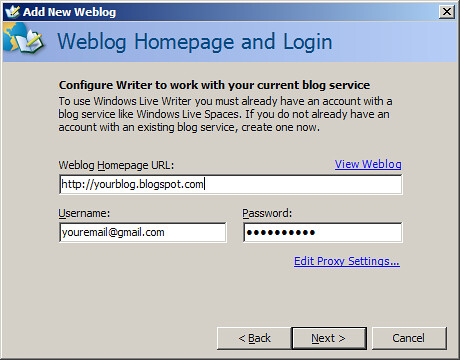
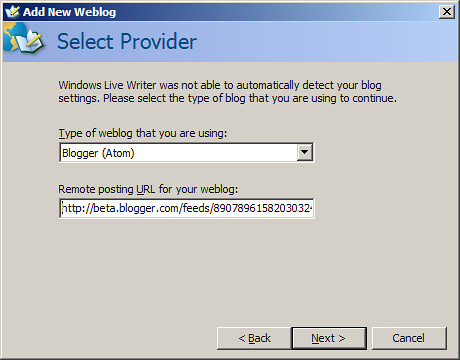
TIP: The Type of weblog for Blogger Beta is Blogger (Atom), and the Remote posting URL is http://beta.blogger.com/feeds/blogID/posts/full. You can see the blogID(a long number) in your web browser's address bar when you manage your posts at Blogger Beta. Below are snapshots showing how to do this.
PS: This post is published using Writer :)
Visit the Writer Zone.
Download the updated Writer.
This post is updated at 2006-09-29 17:11.

